
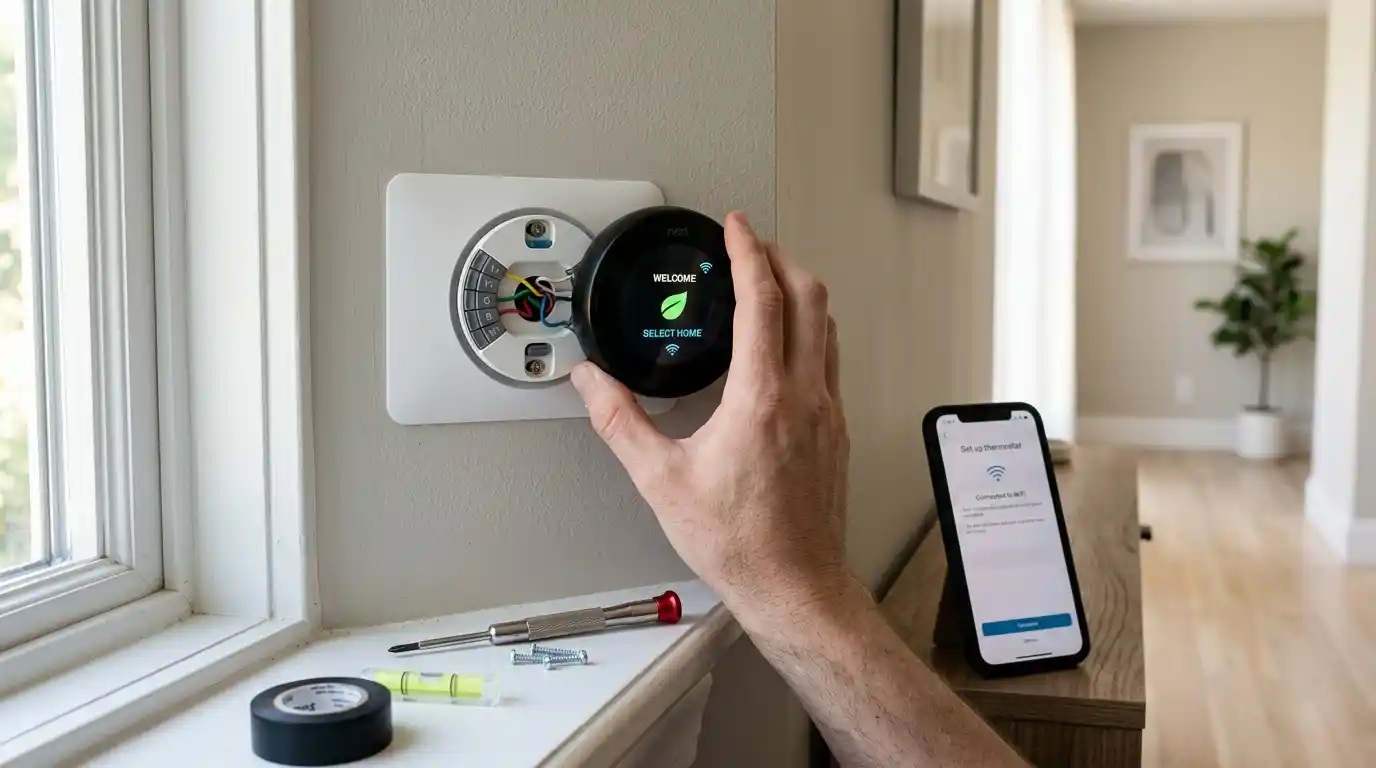
Here’s what nobody tells you before you buy a smart thermostat. Half the returns happen because people skip a five-minute compatibility check first. I’ve watched this play out someone buys a Nest, gets it home, opens up the wall plate. And discovers there’s no C-wire. Now it’s a return, or a power extender kit purchase, or a frustrated call to an HVAC tech. A home thermostat isn’t a universal plug-and-play gadget, whatever the box implies.
This walks through the five things worth checking before you spend $150 to $280 on something that might not even work with your system. Plus what the realistic savings actually look like once it’s installed correctly.
Check Your Wiring Before Anything Else
Most heating and cooling systems run on low-voltage, 24-volt wiring. And most smart thermostats need a common wire the C-wire for continuous power. Older homes, especially ones with systems installed before smart thermostats existed. Sometimes don’t have one wired in, even though the capability’s technically there.
Pull off your existing thermostat’s cover and look at the wiring terminals. If you see a wire labeled “C” already connected, you’re set. If not, that’s not necessarily a dealbreaker most major brands sell a power extender kit (PEK). That solves this without running new wire through your walls, though it does add another step to installation.
Label every wire before you disconnect anything. This sounds obvious and gets skipped constantly. And then you’re standing there with five colored wires and no idea which one goes where.
Do All Smart Thermostats Require a C-Wire?
Not always some models, including certain Nest and ecobee versions, can run without one using internal battery power. Though functionality sometimes gets limited without continuous power. Check the specific model’s compatibility page before assuming either way. Since this varies more than people expect between brands and even between generations of the same brand.
Match the Thermostat to Your Actual HVAC System
This is where a lot of buying guides get lazy they recommend “the best thermostat” without asking what system it’s actually going into. A single-stage furnace, a two-stage system, a heat pump with auxiliary heat. Electric baseboard, radiant floor heating these are genuinely different animals, and not every smart thermostat handles all of them.
Heat pumps specifically trip people up. If your thermostat isn’t configured correctly for a heat pump system. You can end up with the classic complaint of “my heat pump is blowing cold air” which usually isn’t a broken heat pump at all. Just a thermostat set up wrong for auxiliary heat staging.
Dual-fuel systems, mini-splits, and multi-zone setups need even more specific compatibility checks. If you’ve got a mini-split, something like Sensibo’s line is built specifically for ductless systems. Whereas a standard Nest or ecobee is designed around central forced-air.
Will a Smart Thermostat Work With Electric Baseboard Heating?
Not most mainstream ones electric baseboard typically runs on line voltage (120 or 240 volts.) Rather than the low-voltage 24-volt systems most smart thermostats expect. You need a thermostat specifically designed for line-voltage systems, like Mysa, rather than assuming any smart thermostat will work.
Figure Out What You’re Actually Trying to Save
This is the part where marketing gets loosest. You’ll see “up to 26% savings” plastered everywhere, and technically that’s not a lie it’s just the best-case number, not the typical one.
More grounded estimates land in the 8% to 15% range for heating and cooling costs combined, and that’s assuming ENERGY STAR certification and reasonably consistent use of scheduling and eco modes. In dollar terms, most sources put annual savings somewhere between $50 and $200, depending heavily on your climate, your home’s insulation, and how inefficient your habits were beforehand.
Here’s the honest math: HVAC typically accounts for something like 45-50% of a home’s total energy bill. If your annual energy bill runs around $1,400, and HVAC is roughly half of that, even a 10% reduction on the HVAC portion is real money but it’s not going to cut your total bill by 26%, whatever the marketing implies.
How Long Does a Smart Thermostat Take to Pay for Itself?
Usually one to two years, depending on the model’s price and your actual savings rate. A $250 thermostat saving you $150 a year pays for itself in under two years; a $180 model saving the same amount gets there faster. This is genuinely one of the better payback calculations in home tech, but it’s not instant, and it’s not automatic it depends on you actually using the scheduling features rather than just leaving it on a fixed temperature.
Decide Between Learning and Manually Scheduled
Learning thermostats Nest is the most well-known example build a schedule by watching your behavior over roughly the first week, then adjusting automatically. Manually programmed ones require you to set the schedule yourself, which takes more upfront effort but gives you more predictable control.
Neither is objectively better. Learning thermostats work well if your routine is fairly regular; if you work irregular shifts or your schedule changes constantly, a learning algorithm might guess wrong more often than it helps, and a manually set schedule (or aggressive use of geofencing instead) might actually serve you better.
Does Geofencing Actually Work Reliably?
Reasonably well, though it depends on your phone’s location settings staying consistent and your home Wi-Fi being stable. Geofencing adjusts temperature based on whether your phone (and presumably you) is near home, which helps irregular schedules more than a fixed learning algorithm does but it can occasionally misfire if your phone’s location services glitch or your commute pattern is unpredictable.
Consider What a Smart Thermostat Can’t Fix
I want to be honest about this because it gets glossed over in most buying guides. A smart thermostat can’t fix a poorly insulated home, leaky ductwork, or an aging, inefficient furnace. If your actual problem is heat escaping through old windows or a duct system losing air before it even reaches your rooms, a $250 thermostat is optimizing around a bigger structural problem rather than solving it.
If your energy bills are unusually high and you’re not sure why, a professional HVAC inspection or even just checking your air filter and duct condition might matter more than any thermostat upgrade. Sometimes the thermostat is genuinely the right fix. Sometimes it’s a band-aid on something bigger.
Should I Fix Insulation or Buy a Smart Thermostat First?
If you have to choose due to budget, address major insulation or ductwork problems first a smart thermostat optimizes an already-functioning system, but it can’t compensate for a home that’s losing conditioned air faster than the system can replace it.
Conclusion
A home thermostat purchase goes smoothly when you check compatibility before checking out wiring, HVAC type, and realistic savings expectations, in that order. Skip the “up to 26%” marketing number and plan around something closer to 8-15% in most typical households. If your home has underlying insulation or ductwork issues, address those before assuming a smart thermostat alone will meaningfully cut your bill. Get the compatibility right, set realistic expectations, and a smart thermostat genuinely does pay for itself within a couple of years for most households.
FAQs
No some models can run on battery power without one, though functionality may be limited, so it’s worth checking the specific model’s requirements rather than assuming compatibility either way.
Realistic estimates generally fall in the 8% to 15% range for combined heating and cooling costs, translating to roughly $50 to $200 annually depending on your climate, insulation, and previous habits treat higher marketed figures as best-case scenarios, not typical results.
Many people install them successfully as a DIY project, especially with existing compatible wiring, though systems without a C-wire, line-voltage setups, or multi-zone configurations may be worth having a licensed HVAC technician handle instead.